You’re getting clicks. You’re getting visitors. But your leads and sales stay flat. Here’s the uncomfortable truth — and exactly how to fix it.
90%
of website visitors leave without converting
2.35%
average conversion rate across all industries
3 sec
Slow load times can drive away nearly 40% of your users.
70%
of cart abandonments are due to poor UX
You invested in SEO. You ran ads. Your data shows consistent traffic in the thousands each month. Yet your inquiry form sits empty and your revenue barely moves. If this sounds familiar, you’re not alone — and you’re not imagining it. Website traffic doesn’t convert by default. Traffic and conversions are two completely different games.
The Hard Truth About Website Traffic
Getting visitors to land on your website is only half the battle. The second — and far more important — half is convincing those visitors to take action: fill out a form, make a purchase, book a call, or subscribe to your list. When website traffic fails to convert, it means all your marketing spend is generating noise, not revenue.
Industry data consistently shows that the average website conversion rate hovers between 2% and 4%. This means that even a well-performing site is losing over 96 visitors out of every 100 who arrive. For most businesses, that number is even worse. The visitors are coming in — the conversions simply aren’t happening.
The question isn’t whether your traffic will convert on its own. It won’t. The question is: what specific friction points are silently driving your visitors away before they ever become customers?
“More traffic is not the answer. More relevant, well-guided traffic on a strategically designed website — that’s the answer.”
7 Core Reasons Your Traffic Isn’t Converting
Let’s go beyond surface-level tips and get into the actual, data-backed reasons why site visitors don’t convert into customers. Each of these can individually tank your conversion rate — together, they’re devastating.
Traffic-Content Mismatch
You’re attracting the wrong audience. When the visitors arriving at your page have different intent than what your content delivers, they leave immediately — regardless of how beautiful your website looks. This is one of the most common reasons web traffic yields no conversions.
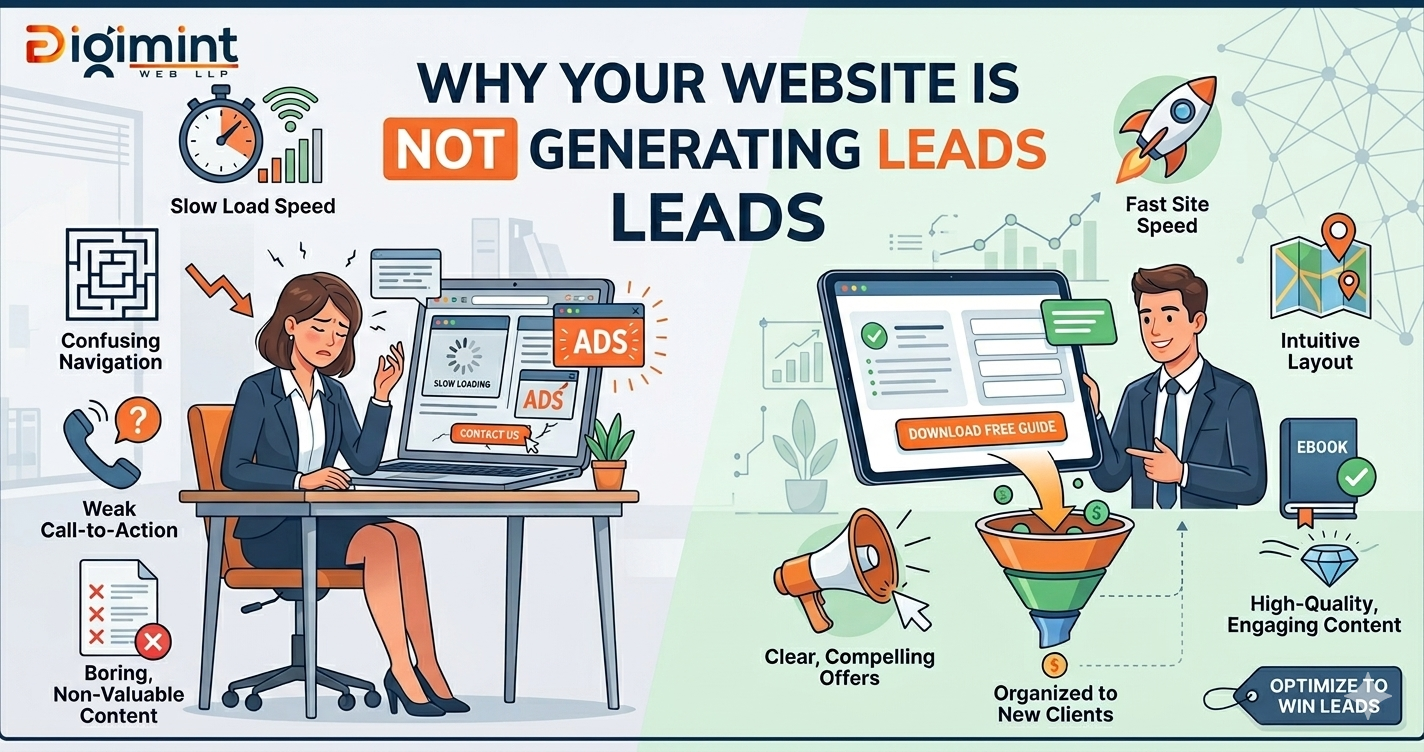
Slow Page Load Speed
A one-second delay in page load time reduces conversions by up to 7%. Visitors have zero patience in 2026. If your website takes longer than three seconds to load, nearly half your audience has already left — before they’ve even seen your offer.
Unclear or Weak Call-to-Action
No clear direction means no action. Generic CTAs like ‘Learn More’ or ‘Click Here’ don’t drive results. Your CTA must be specific, visible, and action-oriented to guide users toward the next step.
Poor Mobile Experience
Over 60% of global web traffic now comes from mobile devices. If your website isn’t optimized for mobile — tiny fonts, broken layouts, hard-to-tap buttons — your mobile visitors will bounce instantly, and your mobile traffic simply won’t convert.
Lack of Trust Signals
People buy from businesses they trust. If your website is missing reviews, testimonials, certifications, clear contact information, or a recognizable brand identity, visitors feel uncertain — and uncertain visitors don’t convert. Trust is the currency of conversion.
Confusing or Dense Copy
If a visitor can’t immediately understand what you do, who you help, and why they should choose you within 5 seconds of landing, they’ll leave. Jargon-heavy, long-winded, or benefit-free website copy is one of the top reasons online visitors fail to convert.
Broken Conversion Funnel
Even motivated visitors will drop off if your checkout process is too long, your contact form is broken, or the path from “interested” to “customer” has too many steps. Friction at any stage of the funnel means lost conversions — even from highly-qualified leads.
Poor User Experience: The Silent Conversion Killer
User experience (UX) is the invisible hand that either guides your visitor toward a conversion — or pushes them away. Many business owners focus so heavily on driving traffic that they overlook the experience those visitors have once they arrive. This is a critical mistake.
When we talk about why organic traffic doesn’t translate into sales, UX issues account for a significant portion of the problem. Navigation that’s hard to understand, pages that feel cluttered, pop-ups that interrupt before visitors are ready, or checkout flows that ask for too much information — all of these create friction that quietly destroys your conversion rate.
Google’s Core Web Vitals — which measure Largest Contentful Paint (LCP), First Input Delay (FID), and Cumulative Layout Shift (CLS) — are now direct ranking and experience factors. A poor Core Web Vitals score doesn’t just hurt your SEO. It means real users are experiencing a frustrating, janky website that gives them every reason to leave.
| UX PROBLEM | IMPACT ON CONVERSIONS | STATUS |
| Page speed above 3 seconds | Up to 40% visitor drop-off | Critical |
| No mobile optimization | 60%+ mobile bounce rate | Critical |
| Unclear navigation | Users can’t find key pages | High |
| Optimized page speed (under 2s) | Conversions increase 15–30% | Target |
| Clear single-focus landing pages | Up to 220% conversion uplift | Target |
Trust Signals and Social Proof
Your visitors don’t know you. They found you through a search result, an ad, or a social media post — and they’re cautious. Before they hand over their email, phone number, or credit card, they want evidence that you’re legitimate, credible, and capable of delivering what you promise.
This is why paid traffic that doesn’t convert is often a trust problem, not a targeting problem. You might be reaching exactly the right people — but if your website doesn’t establish credibility quickly, those ideal prospects will bounce and find a competitor who does.
Effective trust signals include: verified customer reviews and star ratings, case studies with specific results, client logos and partnership badges, security certificates (SSL, payment badges), clear refund or guarantee policies, and authentic team photos. Each of these acts as a psychological cue that reduces hesitation and moves visitors closer to converting.
Proven Fixes to Boost Your Conversion Rate
Now that we’ve diagnosed why website visitors don’t become buyers, let’s get into actionable solutions. These aren’t theoretical — they’re the same conversion rate optimization (CRO) strategies that top digital marketing agencies use to turn underperforming websites into lead-generating machines.
1. Align Traffic Intent with Page Content
Audit your top traffic sources and map them to the intent behind each visit. Someone clicking on a blog post about “website design tips” is not ready to buy — they need educational content first, with a soft CTA. Someone searching “hire website design agency” is ready to convert — they need a direct, offer-focused landing page with a strong call-to-action. Match the message to the mindset.
2. Optimize Above-the-Fold Content
The first thing a visitor sees when they land on your page determines whether they stay or leave. Your headline must communicate your unique value proposition in plain language. Your subheadline should address the specific problem you solve. Place your primary CTA where users can see it immediately. You have approximately 5–8 seconds to convince a new visitor that they’re in the right place.
3. Implement A/B Testing Systematically
Don’t guess what works — test it. A/B testing (also called split testing) lets you compare two versions of a page element — a headline, a button color, a CTA phrase — and determine which one produces better results. Consistent A/B testing is how leading brands reduce their bounce rates and improve conversion rates over time. Start with your most-visited pages and highest-impact elements.
4. Simplify Your Lead Capture Forms
Every field you add to a contact form reduces the likelihood of submission. Research shows that reducing form fields from 11 to 4 can increase conversions by up to 120%. Ask only for what you absolutely need. For first contact, a name and email — or name and phone — is almost always enough. You can gather more information later in the sales process.
5. Add Live Chat or a Chatbot
Many visitors have a specific question that’s blocking them from converting. If there’s no easy way to get an instant answer, they leave. Adding a live chat option or an AI-powered chatbot can increase conversion rates by 20–45% on certain pages. It reduces friction, builds confidence, and captures leads who would otherwise have bounced silently.
6. Create Dedicated Landing Pages for Each Campaign
Sending all your ad traffic to your homepage is one of the most expensive conversion mistakes you can make. Every ad campaign, every keyword group, every audience segment deserves a dedicated landing page that speaks directly to their intent. This single change is often the biggest lever for businesses whose paid traffic isn’t converting at an acceptable rate.
7. Leverage Retargeting Campaigns
Most first-time visitors won’t convert — that’s simply the nature of the buyer’s journey. But that doesn’t mean those visitors are lost forever. Retargeting ads allow you to re-engage people who’ve already visited your site, reminding them of your offer and bringing them back when they’re ready to make a decision. It’s a top-performing, high-return strategy in digital marketing.
Quick-Win Conversion Checklist
Use this checklist to immediately identify where your website is losing conversions. Check each item against your current website and prioritize fixes based on impact.
Conversion Optimization Checklist
The page fully loads in less than 2.5 seconds on mobile.
Use Google PageSpeed Insights to test and identify slow elements
Value proposition is clear within 5 seconds of landing
Ask someone unfamiliar with your business to visit and explain what you do
Primary CTA is visible above the fold on every key page
Use contrasting colors and action-oriented text (“Get Free Quote”, “Start Today”)
Website displays real reviews, testimonials, or case studies
Include names, photos, and specific outcomes wherever possible
Contact forms have 4 fields or fewer
Remove all non-essential fields and test conversion rate uplift
Website is fully responsive and functional on all mobile devices
Validate performance on real devices, not just in-browser tools.
Retargeting pixels are installed and active
Ensure Google Tag Manager, Meta Pixel, and GA4 are properly configured
Traffic sources are mapped to dedicated landing pages
Each campaign or ad group should drive to a relevant, focused landing page
Turning Traffic Into Revenue: The Bottom Line
The reason 90% of website traffic doesn’t convert isn’t a mystery — it’s a collection of solvable problems. Mismatched content, poor load speed, weak trust signals, unclear CTAs, and a broken user experience are all fixable. They just require a systematic, data-driven approach rather than guesswork.
The businesses that win online are not necessarily the ones with the most traffic. They’re the ones who take the traffic they have and squeeze every possible conversion out of it through smart design, persuasive copy, strategic UX, and relentless testing.
Think of your website not as a digital brochure — but as your best-performing salesperson. It works 24/7, speaks to every prospect, and should be compelling enough to turn interest into action. When you treat it that way, low website conversion rates become a problem of the past.
The traffic is there. The opportunity is there. The only thing standing between you and better conversions is the strategy to unlock them.